The shogi game you’ll keep hearing about, finally explained
If you’ve gone looking for a way to play shogi online, you’ve seen the name. Shogi Wars comes up in every “where do I actually play this game” thread, usually with someone saying “just use Shogi Wars” and moving on, as if the app explains itself. It mostly doesn’t, at least not in a language you can read, unless you already know where the settings menu is hiding.
Shogi Wars is made by HEROZ, it’s officially endorsed by the Japan Shogi Association, and it is, by a wide margin, the app where the largest number of people in Japan actually play shogi online. Not the app with the best UI, not the app foreigners find first, the app where the country’s own players spend their commutes.
That’s a different kind of endorsement than a five-star rating, and it’s the reason I still open it most days despite two-dan rank and no shortage of alternatives.
This is the practical guide: how to get it into English, what the free tier actually gives you, whether the paid tiers are worth your money, and who should honestly skip it for something else. I’m not going to pretend every corner of the experience is translated, because it isn’t, and pretending otherwise would waste your first ten minutes in the app.
Switching it to English: four taps, with screenshots
Shogi Wars ships in Japanese by default, which is the single biggest reason English speakers bounce off it in the first thirty seconds. The language toggle exists — it has since 2016 — but it’s buried one tab deep in the settings, where no first-time user would think to look. Here’s the exact path. The screenshots below are from the browser version; the mobile app uses the same screens.
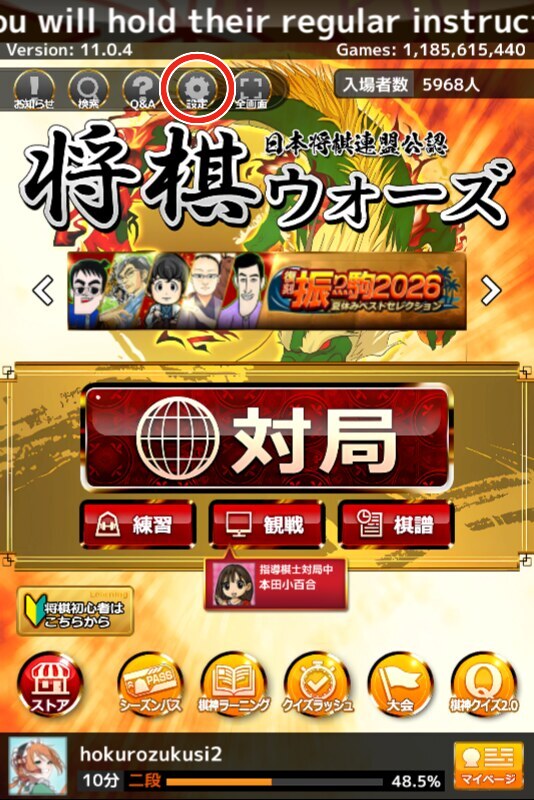
Step 1 — open Settings. On the home screen, tap the gear icon in the icon row near the top. In Japanese it’s labeled 設定; it’s the fourth icon from the left.
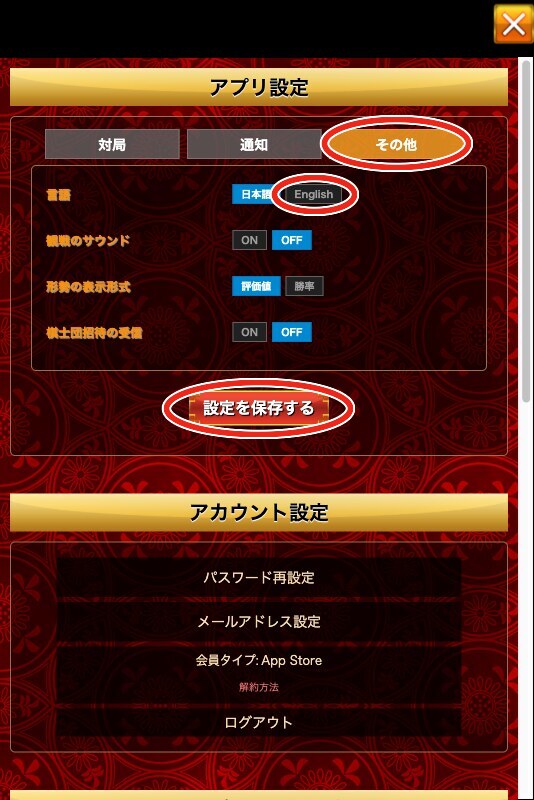
Step 2 — open the “Other” tab and pick English. The settings panel opens on the game tab. Tap the third tab, その他 (“Other”), and the first row is 言語 — language. Tap English.
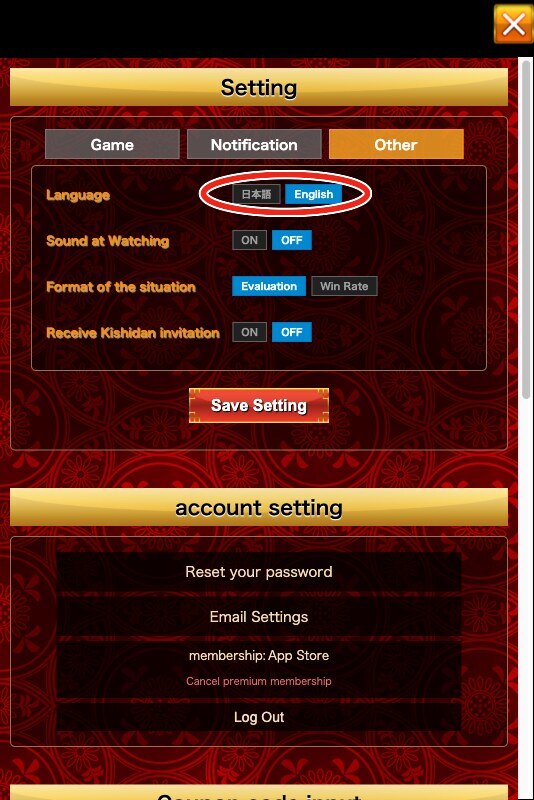
Step 3 — save. Tap the red button below the options, 設定を保存する (“Save Setting”), and confirm the popup. The interface flips to English on the spot — the same panel now reads Language, Save Setting, and everything else in plain English.
Step 4 — close settings, and that’s it. Menus, match screens, rules explanations, and your game history now render in English. Here’s the same home screen from step 1 after the switch:
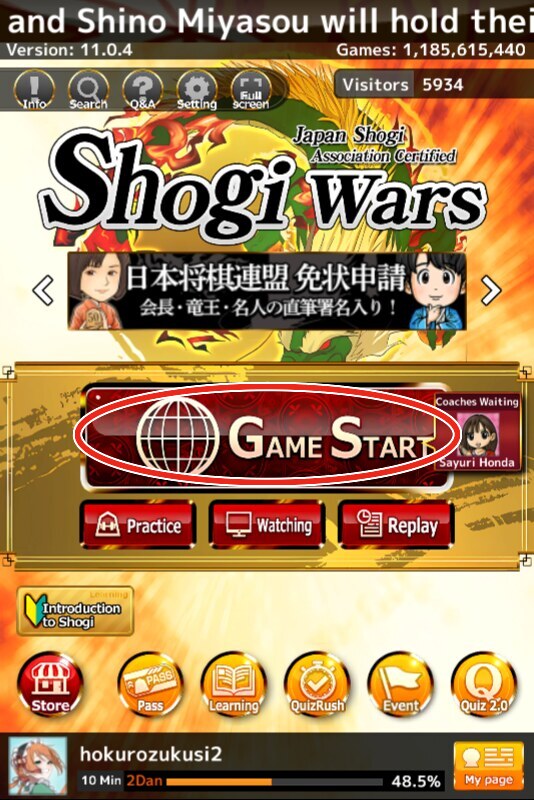
It’s a genuinely competent localization, not a machine-translated afterthought.
What doesn’t flip: some of the voice lines and a handful of graphical flourishes stay in Japanese, permanently. I’d frame that as a feature rather than an apology. You’re learning a Japanese game; hearing an actual Japanese “onegaishimasu” before a match does more for the atmosphere than a dubbed English voice line ever would, and you’ll recognize maybe six phrases total after a week of playing.
What you’re actually getting: platforms and the free tier
Shogi Wars runs on iOS, Android, and in-browser (Chrome, Safari, Edge, and Firefox are all supported), and one account carries across all of them, so you can start a session on your phone during a commute and finish it on a laptop later. That cross-platform account is worth setting up correctly the first time; don’t create separate throwaway accounts per device.
The free tier gives you three games per day, resetting at 4 AM Japan Standard Time. Call it what it is: a daily ration. It’s a deliberate constraint that pushes toward the paid tier, and I won’t dress it up as generous.
For a beginner still working through your first ratings movements, though, three focused games a day is not actually a bad training dose. It forces you to think about each one rather than blitzing through a dozen half-attentive matches, which is a trap plenty of new players fall into on unlimited free servers.
If three games a day starts to feel like a leash rather than a discipline, that’s your signal to either upgrade or supplement with a free alternative, covered below.
The paid tiers, plainly
Two subscription levels exist, and here’s what each buys you, no marketing gloss:
- Premium — ¥600 for 30 days. Removes the three-games-a-day cap entirely and includes four kishin uses, more on those in a second.
- Super Premium — ¥960 for 30 days. Stacks on top of Premium with additional perks for players who want the full feature set.
- Neither auto-renews. You pay once, get thirty days, and it quietly lapses instead of charging you again — a rare bit of user-friendliness in a mobile app subscription, and worth knowing before you assume you need to remember to cancel anything.
For context, kishin (棋神, literally “chess god” but really “shogi god”) is a consumable that calls in an AI, historically Ponanza, to play five moves on your behalf mid-game, at roughly ¥160 per use outside a subscription. It exists for players who want a hint out of a losing position or want to see how a strong engine would have handled a spot.
My honest advice to anyone reading this as a beginner: skip it entirely. Losing games and figuring out why, on your own, is the actual mechanism by which you improve. An AI bailing you out of a bad position teaches you nothing except that the bailout exists.
What playing on it actually feels like
The dominant format on Shogi Wars is short: 10-minute and 3-minute sudden-death games, plus a 10-second-per-move variant. There’s no leisurely 30-minutes-a-side classical time control here; this is a blitz-and-bullet culture, closer to 10-minute chess than to a tournament game. There are five modes in total, including the newer Sprint and Mate Battle — we break down all of them, and the order a beginner should tackle them in, in our guide to Shogi Wars game modes.
I’ll be honest about the pull of it: a 3-minute game is one of the more habit-forming things I’ve done in this hobby, in the same way blitz chess eats an evening you meant to spend on something else. Budget your three free games accordingly, because “just one more” is a real phenomenon here.
The single biggest draw, more than the short games themselves, is the dan and kyu rank system. Because Shogi Wars is the JSA-endorsed app, the rank you earn in it is the de facto answer to “how strong are you?” among Japanese players, and a dan rank achieved there can even be used to apply for an official rank certificate from the JSA itself.
Your rating on the app isn’t a cosmetic number that means nothing outside it; it’s the same currency that matters in Japan’s shogi culture generally. If part of what motivates you is a rank you can actually claim, this is the reason to care about this particular app over a generic online shogi client.
If any of this is new territory, our guide to learning shogi from scratch covers the board, the pieces, and the drop rule before you sit down to your first match, and if you’re coming from a chess background specifically, shogi for chess players will save you from the exchange-evaluation habits that lose games against players who grew up with the drop rule.
When Shogi Wars isn’t the right tool
Three free daily games and a blitz-dominant culture won’t suit everyone, and I’d rather point you elsewhere than pretend this app is the answer for every case.
If you want to think for a long time on every move, Shogi Wars’ time controls will fight you. Lishogi is completely free, ad-free, open-source, and built in the mold of lichess, with no daily cap and time controls you set yourself, correspondence included. It’s the right home for slow, deliberate study games.
If you want a fully free server with a global community and no subscription pressure at all, 81Dojo is JSA-supported, entirely free, and available in over twenty languages, which makes it a genuinely international room rather than a Japan-first app with an English coat of paint.
If you just want the lowest-friction signup possible, ShogiQuest gets you into a game with minimal registration and no cost.
None of these carry the JSA-endorsed rank system the way Shogi Wars does, which is the real trade-off: a rank with cultural weight on one side, unlimited free play and calmer time controls on the other. I use Shogi Wars for the daily blitz habit and the rank, and I’d point a patient long-game player toward Lishogi without hesitation.
Should you actually install it
If your honest answer to “do I want a real rank and a taste of where Japan actually plays” is yes, install Shogi Wars, flip the language toggle in Settings, and treat your three daily games as a feature, not a punishment. Once you’re hooked on the format and want unlimited play, ¥600 for thirty days is a low bar to clear, and skip the kishin credits either way; they’re not part of getting better.
If you’d rather play unlimited, unhurried games for free while you’re still building the fundamentals, start on Lishogi or 81Dojo instead, and come back to Shogi Wars once you want the rank to mean something.
Either way, once the moves start feeling natural and you’re drawn to trying tactics away from the screen, our beginner’s guide to tsume shogi is the next step, and once you know a handful of openings by name, shogi openings for beginners picks up from there. And if the app play hooks you enough that you start wanting to feel the pieces under your fingers instead of tapping a screen, our shogi set buying guide covers what’s actually worth buying for your first physical board.
FAQ
How do I change Shogi Wars to English? Open the app, tap the gear icon on the home screen, open the third settings tab (その他 / “Other”), set 言語 (Language) to English, and tap the save button. The app has supported English since 2016, and the translation covers menus, rules, and match history. Some voice lines and graphics stay in Japanese.
Is Shogi Wars free? Yes, with a limit of three games per day, resetting at 4 AM Japan Standard Time. Unlimited play requires a Premium subscription at ¥600 for 30 days, which does not auto-renew.
What is kishin in Shogi Wars? Kishin is a paid feature that lets an AI, historically Ponanza, play five moves for you mid-game, priced around ¥160 per use outside a subscription, with four included in the Premium tier. It’s a shortcut out of a bad position; beginners are better off skipping it and learning from their losses instead.
Can I play Shogi Wars in a browser, or do I need the app? Both. Shogi Wars runs on iOS, Android, and in-browser through Chrome, Safari, Edge, or Firefox, and one account works across all of them.
What’s a free alternative to Shogi Wars? Lishogi is completely free with no daily limit and flexible time controls, good for slower study games. 81Dojo is free, JSA-supported, and available in over twenty languages. Neither carries the JSA-endorsed rank system that Shogi Wars does.